Authorization via the Telegram app
Fast and secure login with a code delivered directly in
Telegram for maximum convenience
Authorization via the Telegram app

Telegram Password
Start demonstration

- Enter your phone number in the correct format (no messages will be received during the demo)
- Enter the code from the pop-up message on the demo stand
- The service process is complete. Successful authorization!
 Telegram • Delivered instantly
Your login code for your account: 2839
Advantages of Telegram Password
Alternative to SMS
A convenient alternative for SMS-based authentication for your customers, which is three times cheaper
Work in cascade
Ability to combine with other authentication services offered by Unibell
No bot required
The authorization code comes directly from the official Telegram system, not from a bot
Where is Telegram Password used

In two-step authentication, when an additional code is required beyond the main password
During password recovery or changes on websites and in mobile apps
In services to protect against bots, verifying that a real person is interacting with the system
When deducting bonuses or receiving discounts through a loyalty program
For getting one-time access without registration: downloading files, viewing content, etc
Who is the Telegram Password service suitable for

ECommerce
Simplify the authorization process for customers during purchases and account access
Educational platforms
Secure access for students and teachers to learning resources
Medical organizations
Рroviding access to personal patient data in personal accounts
Рroviding access to personal patient data in personal accounts
Сonfirming bookings and granting access to personal accounts in apps and websites
How to connect Telegram Password services
1. Request a сonsultation
Contact our team via the feedback form or by phone. We are ready to answer all your questions and help you choose the best solution for your business.
2. Contract signing
After selecting the authorization system, we will prepare and agree on a service agreement with you. This ensures transparency and protects your interests.
3. Technical integration
Our development team will integrate the authorization system into your existing business processes. After integration, we will perform system testing to guarantee its correct operation and compliance with all specified functions.
4. Service launch
After completing all stages and successful testing, the authorization system will be put into operation. You will be able to enjoy all the benefits it provides.
For all business sectors interacting with clients

Using convenient Telegram Password authentication, customers receive discounts and loyalty program bonuses

Implemented authentication through Telegram for login to the mobile app for booking workouts

Implemented cost-effective cascade authentication for customers within the client’s app
A convenient and cost-effective way for users to authenticate on websites and in apps
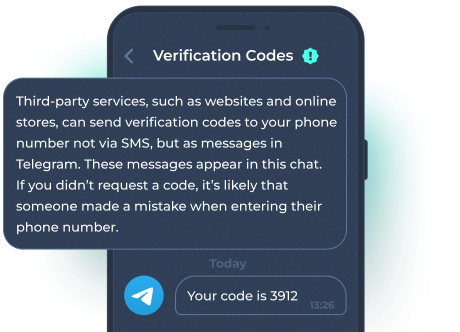
The Telegram Password service is a simple login method that allows you to receive access codes directly in Telegram, instead of the usual SMS. Here's how it works: when you log in, the system prompts you for your phone number. Then, the code is sent in Telegram from the official "Verification Codes" system. You enter this code into the website or app form. The system verifies it, and you can continue. This is a handy alternative to SMS login, and it’s twice as affordable. The authorization code comes from Telegram’s official system, not a bot, ensuring higher security. Telegram Password can be used in various situations—for example, for two-factor authentication when an additional code is needed besides your password. It’s also useful for resetting or changing passwords on websites or in mobile apps. Additionally, it’s employed in services to prevent bots, confirming that a real person is interacting with the system. It’s convenient for deducting bonuses, granting loyalty discounts, or providing one-time access to files or content without registration.
Why choose Unibell?
By choosing Unibell, you get a reliable solution that helps your business grow and develop while ensuring safety and convenience for your clients
Customer Support
Our team of professionals is always ready to assist and answer any questions. We provide technical support so you can focus on your business without worrying about technical issues.
Affordable Prices
We offer competitive rates for our services, making a high-quality authorization system accessible to businesses of all sizes.
Speed
Our authentication systems provide instant identity verification, helping to speed up registration and login processes, enhancing the user experience.
Reliability and Convenience
Get a dependable solution for your clients’ convenience with Unibell’s authentication systems—key to your business’s growth and success.
Free Testing of Telegram Password
Frequently asked questions
What if the client doesn’t have the Telegram app?
In that case, we recommend connecting cascade authorization using Telegram Password + SMS. The client receives the authorization code in the Telegram app, and if delivery is not possible, an SMS message is automatically sent.
How long does the integration take?
Technical integration via the Telegram Password API typically takes about 3-4 working hours on our side. After that, we allocate an additional 1-2 days for testing the authorization process.
Does the authorization code come through a bot?
No, we provide our clients with authorization via Telegram’s official system. That way, the code is sent from the verified "Verification Codes" channel, not from a bot. This is an important security measure to protect against fake messages.